Benefit Express
Case Study
Benefit Express
Overview
Benefit Express is a leading benefit management company, serving a diverse range of clients, including renowned corporations like Crate & Barrel, Lululemon, One Gas, Kohler, Sabic, brokers such as Optum, and government entities like the City of Detroit. The existing SaaS solutions lacked style and future functionality, leading to client dissatisfaction. As a Senior UX/UI Designer, my role was to revamp the designs of Benefit Express' benefit management SaaS solutions.
Role
Duration
Tools
Challenges
Benefit Express' SaaS solutions prioritized functionality over aesthetics, resulting in concerns raised by clients. The company recognized the need to enhance the visual appeal and user experience of their products.
Goals
- Create a Clean Aesthetic: Develop new designs with a clean aesthetic that aligns with the established branding by the marketing department. This involves creating a comprehensive style guide incorporating the new typography and color palette.
- Stakeholder Collaboration: Define project scopes and establish a roadmap by conducting meetings with stakeholders, product owners, and business analysts. Collaborate to identify user flows, journey maps, roles, and write user stories to guide the design process.
- Agile Development Environment: Work across three development teams, engage in daily standups, and review user stories using VSTS and Aha! Teams. Collaborate effectively with both in-office and remote teams.
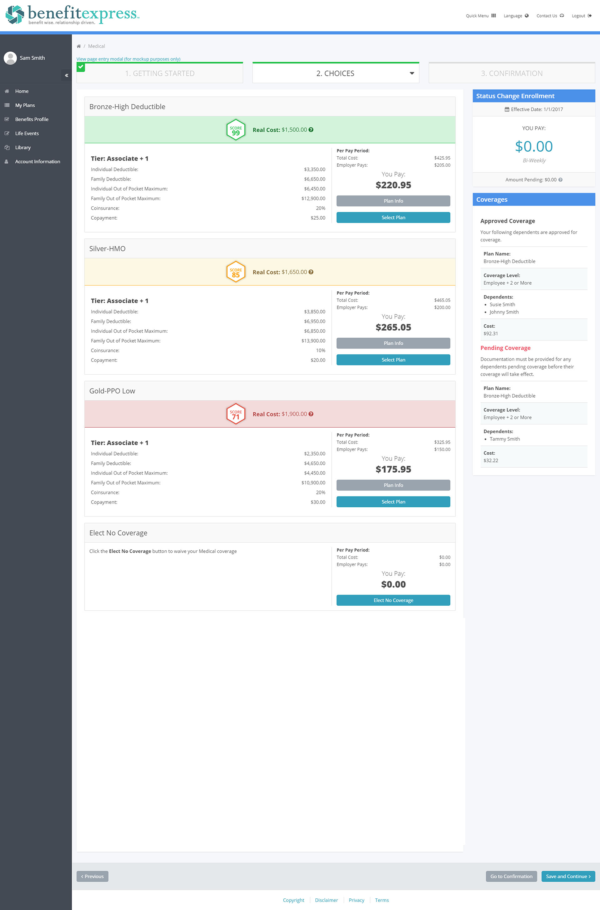
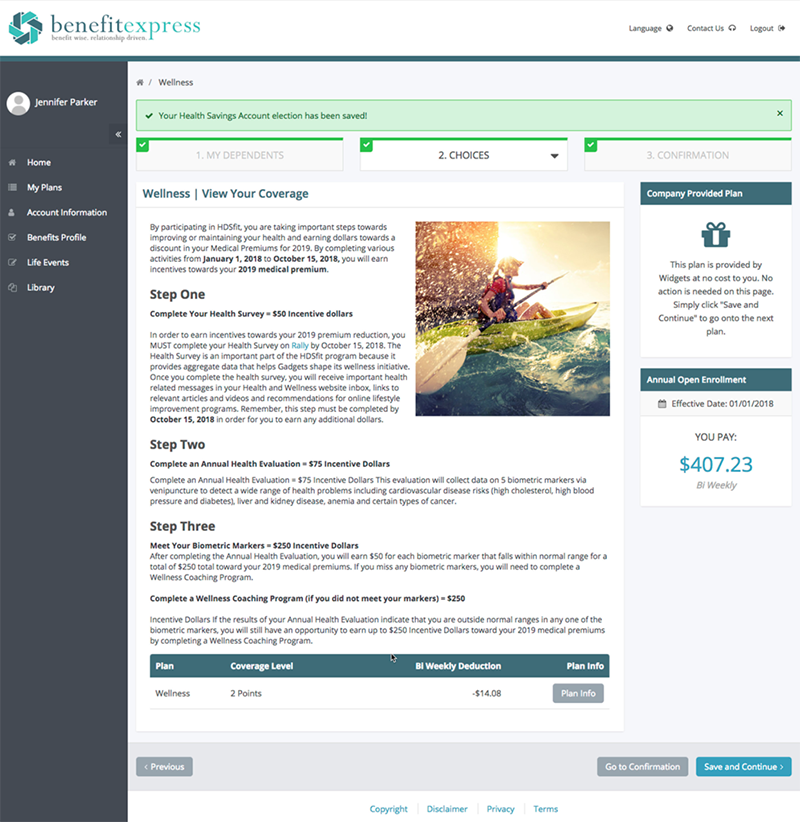
- Design Iteration and Prototyping: Create mockups in Photoshop and wireframes in Figma, refining the designs through iterative feedback. Develop pixel-perfect prototype pages using HTML, CSS, and Bootstrap, ensuring a seamless transition from design to development.
- Collaboration with Development: Conduct regular meetings with product owners and business analysts to evaluate wireframes and prototypes. Address queries related to designs and code from developers and QA professionals.
Process
Research and Discovery
Understand client pain points and current user experiences to identify areas for improvement.
User Personas
Create detailed user personas representing different client and broker segments.
Wireframing
Develop wireframes to outline the structure and flow of the new SaaS solutions.
Branding
Incorporate the new branding elements into the designs to create a cohesive look and feel.
Creating the Prototype
Transform wireframes into interactive prototypes for user testing and validation.
Stakeholder Demonstrations
Regular demonstrations were conducted to gather feedback, validate design choices, and ensure alignment with stakeholder expectations.
Target Demographic
MBE's target audience includes HR professionals, benefits administrators, and employees of the client organizations, who rely on the platform to manage employee benefits, enrollment, and compliance efficiently.
User Personas
HR Administrator - Amy
Amy is an HR Administrator working for a medium-sized manufacturing company that utilizes the MBE SaaS from Benefit Express to manage employee benefits and enrollment. She is responsible for day-to-day tasks related to benefits administration, such as adding new employees to the system, updating benefit plans, handling employee queries, and generating reports for upper management. Amy needs a user-friendly interface that allows her to efficiently navigate through different benefit options, manage employee data securely, and communicate with employees about benefits updates or changes.
Super Administrator - Michael
Michael is the Super Administrator at a large multinational corporation. He oversees the entire benefits administration process across multiple divisions and locations. Michael requires robust control and management capabilities within Benefit Express SaaS products. He needs to have access to comprehensive analytics and reporting features to make data-driven decisions, manage user permissions, and ensure compliance with regulations and company policies. Michael also values a platform that provides seamless integration with the company's HRIS and payroll systems, streamlining processes and reducing the risk of errors.
Employee - Sarah
Sarah is an employee of a tech startup that uses MBE from Benefit Express to enroll in and manage her benefits. She values convenience and simplicity, expecting a straightforward and intuitive user interface. Sarah wants to easily compare different benefit plans, understand coverage options, and enroll in or make changes to her benefits with minimal effort. As an employee with a busy schedule, Sarah appreciates clear communication about benefit changes, deadlines, and the ability to access MBE from various devices, including her smartphone, to manage her benefits on the go.
Wireframing
Creating wireframes for SaaS products at Benefit Express is a crucial step in the design process to ensure a seamless user experience. As a Senior UX/UI Designer, my role involved collaborating closely with product owners, project managers, and business analysts to understand the unique requirements of each SaaS product. With a user-centric approach, I begin by conducting in-depth research and analysis of user needs, industry trends, and competitors' offerings. Armed with these insights, I created mockups using Photoshop and low-fidelity wireframes using Figma, focusing on the core functionalities and information architecture. These mockups and wireframes serve as a blueprint, outlining the layout, navigation, and interactions of the SaaS product. Through an iterative feedback process, I refined the wireframes, ensuring they align with Benefit Express' branding guidelines and incorporate a clean and intuitive design.
Branding
Working closely with the marketing department while creating branding for SaaS products from Benefit Express was an enriching and collaborative experience. As a Senior UX/UI Designer, I understood the significance of aligning the product branding with the established corporate branding guidelines to maintain a consistent and cohesive brand identity. Through frequent meetings and brainstorming sessions with the marketing team, we delved into the essence of the corporate brand and its core values. This valuable insight guided the development of the SaaS products' visual elements, including typography, color palette, iconography, and overall design aesthetics. By integrating these branding elements seamlessly into the SaaS products, we ensured that they not only reflected the essence of the company but also resonated with the target audience. The close partnership with the marketing department allowed us to create a strong brand identity for the SaaS products, reinforcing Benefit Express' market presence and fostering a sense of trust and familiarity among users and clients.
Creating the prototype
Functional prototypes were developed using HTML, CSS, and Bootstrap 5, allowing stakeholders and the development team to interact with the designs in a realistic manner. This ensured usability and feasibility.
Result
The successful implementation of the revamped UX/UI designs resulted in enhanced client satisfaction and strengthened relationships with existing clients and brokers. The improved aesthetics and future-focused functionality attracted new clients and brokers. Introduction of Microsites further expanded Benefit Express' offerings and gained new clients. The collaboration with the marketing department ensured the successful implementation of Microsites. The team consistently delivered projects on-time or ahead of schedule, achieving the project's goals.
At A Glance
- Project Type: Full-Time
- Employer: Benefit Express
- Location: Hybrid
- Start Date: November, 2017
- End Date: December, 2019
- Tools Used: Figma, Adobe Creative Suite, Visual Studio Code